www.Jatag.com

Business: 630-412-1430 Email: Support@Jatag.com

Jatag Solutions Newsletter

CEO CORNER

Choosing the Right Internet for Your Office

Questions we get asked often is:

“How much internet speed does our office actually need?”
“Should we bundle it with our phones?”


The answer is… it depends—but there are a few things every business should consider before signing that next ISP contract.

For most offices, the internet is no longer just “internet.” It powers your phones, Teams meetings, cloud apps, backups, file sharing, security cameras, guest Wi-Fi, and often your building access systems too. That means choosing the right provider, and the right type of connection, matters more than ever.


Start with the type of connection

For business environments, the most common options are:

Fiber – First choice Fast, reliable, and symmetrical upload/download speeds. Excellent for cloud systems, VoIP phones, and remote work.

Cable Internet – Solid option for smaller offices. Good speeds, but upload performance can be limited depending on the carrier.

Wireless / 5G Backup – Not always ideal as primary internet, but a great backup connection for business continuity and failover when primary fails

How much speed do you actually need?

More speed isn’t always the answer.
We often see companies paying for gigabit service when they’re only using a fraction of it.

Should phones be bundled with your ISP?

Bundling internet and phone service can simplify billing and support.  But it can also create a single point of failure.  Also, separate VOIP phone systems can give you other support options like using a phone at a home office.


At JATAG, we review these with clients regularly because the right internet plan should support your business—not just add another monthly bill.


OPERATIONS CORNER

AI Isn’t as Scary as It Sounds

If AI makes you picture rogue robots or inscrutable black boxes, you are not alone. But for most of us, AI is less like science fiction and more like a practical tool—similar to spellcheck, maps, or a calculator. It can feel new and fast-moving, yet the basics are surprisingly approachable.

At a simple level, today’s popular AI is software trained on large amounts of text, images, or code to spot patterns and make useful predictions—such as what word should come next in a sentence. That’s why it can draft an email, summarize a meeting, brainstorm ideas, or help you rephrase a message in a friendlier tone. It is not “thinking” the way humans do; it’s producing likely outputs based on what it has learned.

The easiest way to get comfortable is to treat AI like an intern: helpful, quick, and sometimes wrong. Ask it for a first draft, a list of options, or a simplified explanation—then you stay in charge of the final call. A good habit is to request structure (“Give me three bullet options”), context (“Assume the reader is new to this”), and constraints (“Keep it under 150 words”). The clearer your prompt, the better the result.

It is also worth knowing where caution matters. AI can confidently invent details, misunderstand nuance, or reflect biases found in its training data. That means it’s best used for low-risk tasks—brainstorming, outlining, rewriting, summarizing—while anything high-stakes should be verified with reliable sources and human judgment. To help with verifying use “Include your sources in your response” in your prompt.

And if you’re not sure where to begin, we are here to help. 

CYBER CORNER

The Growing Risk of Supply Chain Attacks

Cybercriminals are changing tactics. Instead of attacking a company directly, many are targeting the vendors, software providers, or service partners that businesses rely on every day. This is called a supply chain attack.

Think of it this way: rather than trying to break through the front door, attackers look for a trusted side entrance. If a software vendor or third-party provider is compromised, hackers may be able to use that connection to gain access to many businesses at once.

This is why cybersecurity is no longer just about protecting your own network—it’s also about knowing who you trust with your data.

A few good questions to ask:

  • Who has access to your systems or sensitive information?

  • Are your vendors using strong security practices like multi-factor authentication?

  • Do you know how you would be notified if one of your providers had a breach?

At JATAG, we encourage businesses to review not just internal security, but also the tools and vendors connected to their environment. Your security is only as strong as the weakest link in the chain.

PRODUCT SPOTLIGHT

Introducing Browser Security Protection with Atakama

The web browser has become a critical tool for your business. Email, Microsoft 365, banking, file sharing, SaaS apps, and even AI tools all run through the browser—which also makes it a top target for phishing, malware, and data theft.

That’s why JATAG Solutions is excited to offer Atakama Browser Security as a new service for our clients.

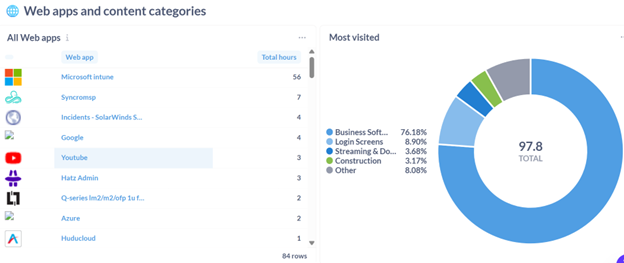
Atakama adds an extra layer of protection directly inside the browser to help stop phishing attacks, block malicious websites, monitor risky activity, and reduce the chance of sensitive company information being shared where it shouldn’t. It also gives businesses better visibility into browser and SaaS app usage across their organization.

What this means for your business:
✅ Stronger protection against phishing, malware, and browser hijacks
✅ Safer browsing for employees in and out of the office
✅ Better visibility into web and SaaS application use
✅ Tracking of websites visited and files downloaded and sent out


Interested in learning if Atakama is a fit for your environment?


Example of one of the reports that can be generated:

Copyright © {{right_now.year}}  {{location.name}}, All rights reserved.

Want to change how you receive these emails? You can unsubscribe from this list.